Windows 98 Performance
Tips.
You can gain system speed by changing your
computer's role from Desktop Computer to Network Server.
With the Desktop Computer Setting, VFAT allocates memory for the 32 most
recently accessed folders and the 677 most recently accessed files, consuming
approximately 10K of memory. When you use the Network Server setting, VFAT
allocates memory to record the 64 most recently accessed folders and the 2729
most recently accessed files, consuming approximately 40K of memory. The
additional 30K RAM is well worth it.
To change the setting:
Right-click the My Computer
Icon.
Click Properties.
Click the Performance
tab.
choose the File System
tab.
Change Typical Role of This Computer
to Network Server.
Windows 98 Overall
Performance
Microsoft says it did not set out to make significant improvements in the
general system performance of Windows 98. Our tests confirm this. We saw no
improvement in start-up speed, although shutdown seemed faster with Windows 98.
The most dramatic improvement we saw was in loading applications. Applications
frequently loaded up to 50% faster with Windows 98.
Saving Disk Space
Operationg systems like Windows store files on hard disks in
clusters. These clusters range in size according to the size of the hard disk.
Any disk greater than 1GB in size uses 32K clusters. A 1-byte file would use up
the same 32K that a 30K file requires. Windows 98, however, supports a
32-bit File Allocation Table (FAT32) file system, which means it can store
files in smaller clusters (as small as 4K), a more efficient method than with a
16-bit FAT (FAT16).
To give an idea, a 1GB hard drive, with Windows 95, Microsoft Office, Microsoft
Publisher, and some miscellaneous files, takes about 530MB of disk space. After
upgrading to Windows 98, installing FAT32, and running the Maintenance Wizard,
we cut the amount of used space down to 480MB.
Another advantage of FAT32 is the ability to support larger hard drives.
Windows 95 can support a partition no larger than 2GB. Windows 98 can support a
single partition hard drive up to 2 Terabytes.
App Load Improvement
Using a combination of FAT32 and the new Maintenance
Wizard in Windows 98, you can improve application load times by 50% or more. As
stated before, FAT32 cuts the cluster size on your hard disk to 4k. The Windows
cache, by coincidence, reads from your hard disk in 4k clusters. Windows 98
will load applications faster simply because it is now reading and writing
information using the same cluster size.
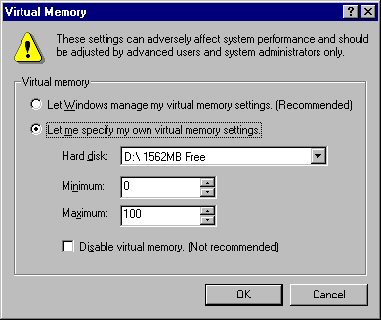
Permanent Swap File
Unless it is turned off (which is not recommended),
Windows will use Virtual Memory no matter how much physical RAM is on your
computer. A quick way to speed up your virtual memory is to purchase
another IDE Hard Disk, the size around 65 to 200 megabytes in size, these sized
hard disks are usually easy to find for under 35 dollars. By using a
separate hard disk, the Swap File, and your normal "C:" drive, will
become less fragmented, allowing your system to run
faster. Set your swap file minimum to be at least 25MB, and Windows will not
have to "dynamically" expand and shrink it, which will also speed up
performance
You can monitor your swap file size by using System Monitor. Choose Memory
Manager, Swap File Size to monitor the size of your swap file.
Another option is to set up a swap file with a minimum size. Use System Monitor
to see the average size of your swap file, and set the minimum to that (click
Start, Settings, Control Panel. Choose the System icon, click the Performance
tab, then Virtual Memory tab, and choose Let Me Specify My Own Virtual Memory
Settings).
Uncheck Removable
Floppies
Win98 has a setting to check for
removable floppies
which is set to "on" by default. You can uncheck this
for a faster bootup if you don’t have any removable
floppies. Click Start, Settings, Control Panel and
double-click the System icon. Click the Performance tab, and click the File
System tab. Under the Floppy Disk tab,
uncheck "Search for new floppies every time your computer starts.